

Some collections are planned. Others take shape one upgrade, one project, and one saved box at a time.
My collection of older technology belongs to the second category. It includes boxed operating systems, network software, business applications, processors, a math coprocessor, networking hardware, and part of a Burroughs disk system. Some pieces came from technologies I worked with directly. Others represent important branches of computing history that competed for a place on the business desktop.
Displayed together, they tell a larger story: the transition from command-line systems and interchangeable processors to graphical desktops, connected offices, standardized business platforms, and eventually cloud-managed environments. They also preserve an era when an upgrade meant opening a case, changing a processor, installing an expansion card, loading drivers, and feeding a machine a stack of floppy disks.
Where the PC Story Begins
One of the most historically important pieces in the collection is IBM DOS Version 1.1. The original IBM Personal Computer arrived in 1981, and DOS became the foundation of the rapidly expanding IBM-compatible market. IBM PC DOS was developed by Microsoft for IBM and closely related to the MS-DOS product Microsoft licensed to other manufacturers.
By modern standards, DOS 1.1 was extremely limited. Early DOS lacked subdirectories and hard-drive support; Version 1.1 primarily expanded storage by supporting double-sided floppy disks. Those constraints show how young the PC industry still was. Yet this modest command-line system helped establish a common software platform around which hardware manufacturers, application developers, consultants, and corporate IT departments could build.
Lotus 1-2-3 Version 1.0A helps explain why businesses embraced that platform. By combining spreadsheet calculations, charting, and database-like functions, Lotus turned the IBM PC into a serious analytical tool. Managers, accountants, and business owners could revise assumptions, produce reports, and create charts without depending entirely on a mainframe workflow or custom programming. Lotus was not merely a popular application; it helped justify the purchase of the PC itself.
Together, IBM DOS and Lotus 1-2-3 capture the moment when personal computing became commercially consequential. One supplied the foundation. The other supplied a compelling reason to use it.
Windows Becomes the Desktop
The Microsoft boxes in the collection trace the PC’s transformation from a DOS-based tool into the graphical system most people now recognize. Windows 3.1 represents the point at which the graphical interface became normal in business computing. It still depended on DOS, but it offered a more approachable environment for applications, file management, printing, fonts, and multitasking. Consistent menus and visual conventions made the computer feel less like specialist equipment and more like something that belonged on every desk.
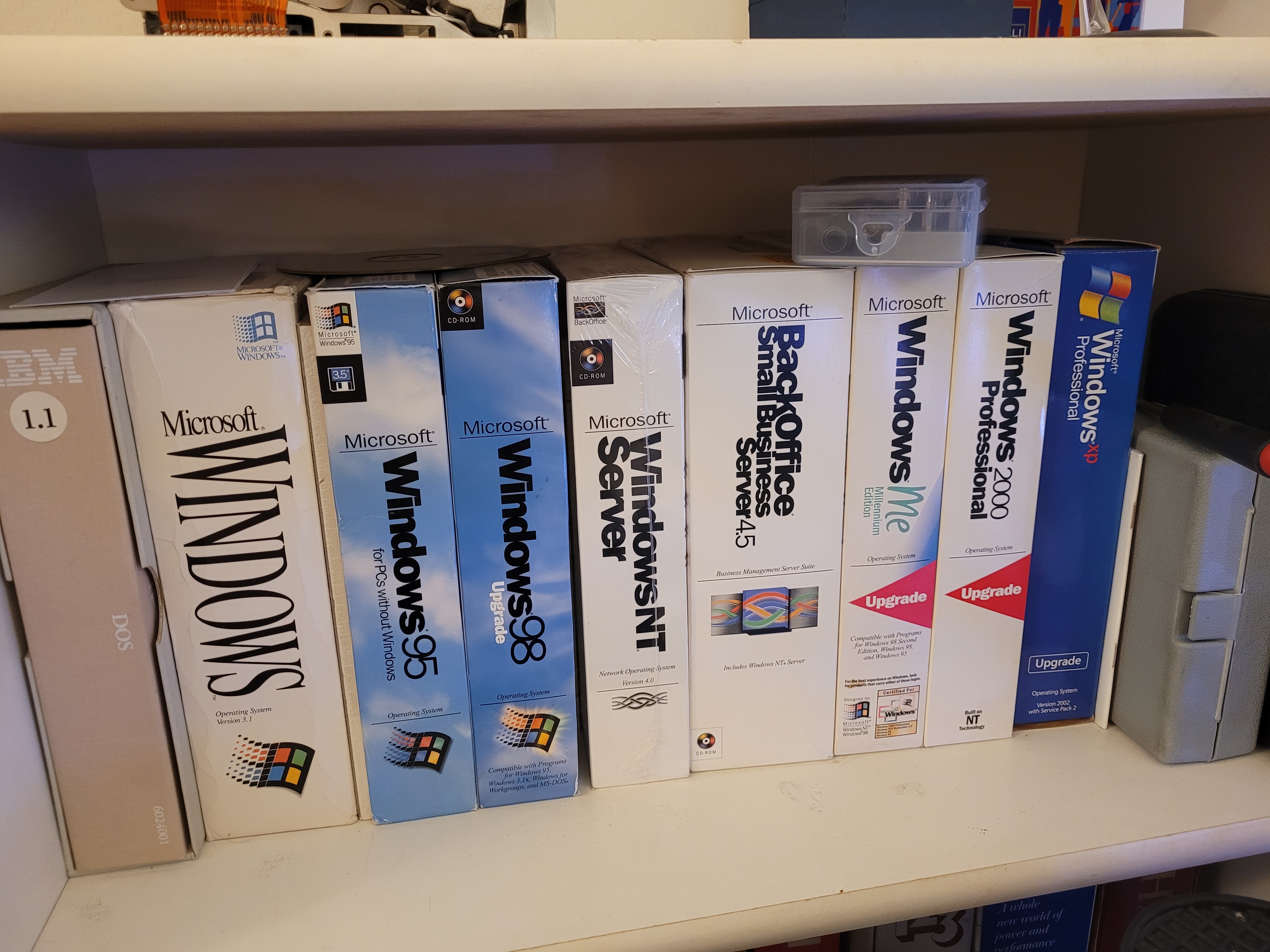
Windows for Workgroups 3.11 added another defining element: built-in support for a connected office. PCs increasingly needed to share files, printers, and communications resources. Its position beside the Novell products on my shelf captures a pivotal moment, when Microsoft began moving directly into a networking market where Novell was already established.
Windows 95 and Windows 98 brought personal computing firmly into the mainstream. The redesigned desktop, Start button, expanding support for Plug and Play hardware, CD-ROM applications, multimedia, and Internet access reshaped expectations. The PC was no longer only a corporate or enthusiast device; it was becoming a fixture in homes as well as offices.
Windows Me sits near the end of the consumer Windows line built on the Windows 9x foundation. Its lasting significance is its position in the timeline: the final stage before Microsoft consolidated its desktop future around the Windows NT architecture. Windows 2000 Professional demonstrated the maturity of that architecture in business, while Windows XP brought home and professional users onto the same foundation. Viewed as physical upgrade packages, they show Microsoft’s progression from graphical environments layered over DOS to a more stable and enterprise-ready operating system.
From the Desktop to the Server Room
Windows NT Server 4.0 and Microsoft BackOffice Small Business Server 4.5 represent the growing importance of servers in Microsoft-based organizations. The sealed five-user copy of Windows NT Server is especially evocative of the period. Licensing was tangible: software arrived in a substantial box with media, printed documentation, product keys, and a clearly defined number of permitted users.
Windows NT Server helped Microsoft compete for a broader role in file services, business networking, and application hosting. It formed part of the industry’s gradual movement away from specialized or proprietary platforms toward environments increasingly centered on Windows desktops and Windows servers.
It brought capabilities normally associated with larger enterprises within reach of companies without large IT departments.
That box therefore marks more than a product release. It represents an early point on the path toward the consulting work I would later perform around identity, collaboration, security, device management, and cloud services. The delivery model has changed dramatically, but the goal remains familiar: make sophisticated technology practical, supportable, and useful to the business.
When Novell Ruled the Network
Before Windows Server became the expected center of many business networks, Novell NetWare was one of the most important names in PC networking. My collection includes NetWare 3.12, IntraNetWare 4.0, NetWare 4.2, and a Novell network interface card.
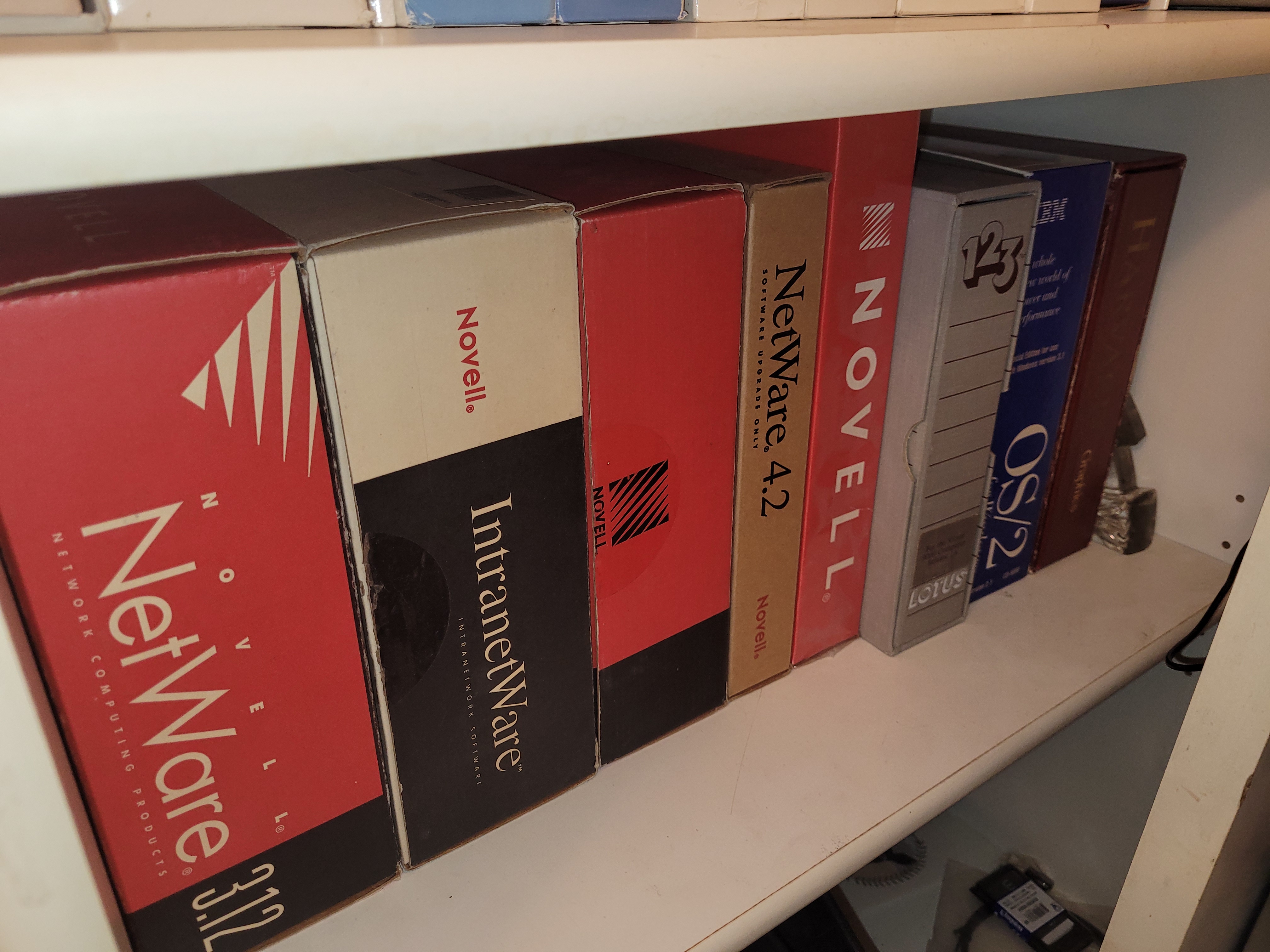
NetWare connected PCs to centralized file and print resources at a time when networking was a specialized discipline. NetWare 3.12 reflects the classic server-centered model used by many organizations. NetWare 4 introduced Novell Directory Services, extending administration toward a directory-based view of users and resources across an organization.
The network card completes the story. Connectivity was not a setting one simply assumed would be present. A PC needed compatible hardware, correct drivers, appropriate cabling, client software, and a carefully configured protocol stack. Every layer could become a troubleshooting exercise.
Placed beside Windows for Workgroups and Windows NT Server, the Novell products capture an industry in transition. Novell approached the connected office from the network operating system and directory. Microsoft advanced from both the desktop and server. Today, centralized identity, policy, and resource management are treated as fundamentals. On this shelf are some of the systems through which those ideas matured.
OS/2 and the Road Not Taken
IBM OS/2 Version 2.1 represents one of the most fascinating alternative paths in PC operating-system history. OS/2 began as a joint IBM and Microsoft effort intended to provide a more advanced successor to DOS. By Version 2.1, IBM had a 32-bit platform with protected-mode operation, multitasking, virtual memory, the Workplace Shell, improved hardware support, and compatibility with Windows 3.1 applications through Win-OS/2.
Those capabilities made OS/2 technically ambitious, but technical strength alone does not determine which platform becomes dominant. Developer support, hardware compatibility, licensing, partnerships, marketing, timing, and customer confidence are equally powerful forces.
A Processor Timeline You Can Hold
The processor collection may be the most visually compelling part of the shelf. It spans the Intel 80286, 80386, 80387 math coprocessor, several 486 variants, the original Pentium generation, Pentium Pro, Pentium II, Pentium III, and Pentium 4. It also includes compatible processors from AMD, Cyrix, and Texas Instruments.
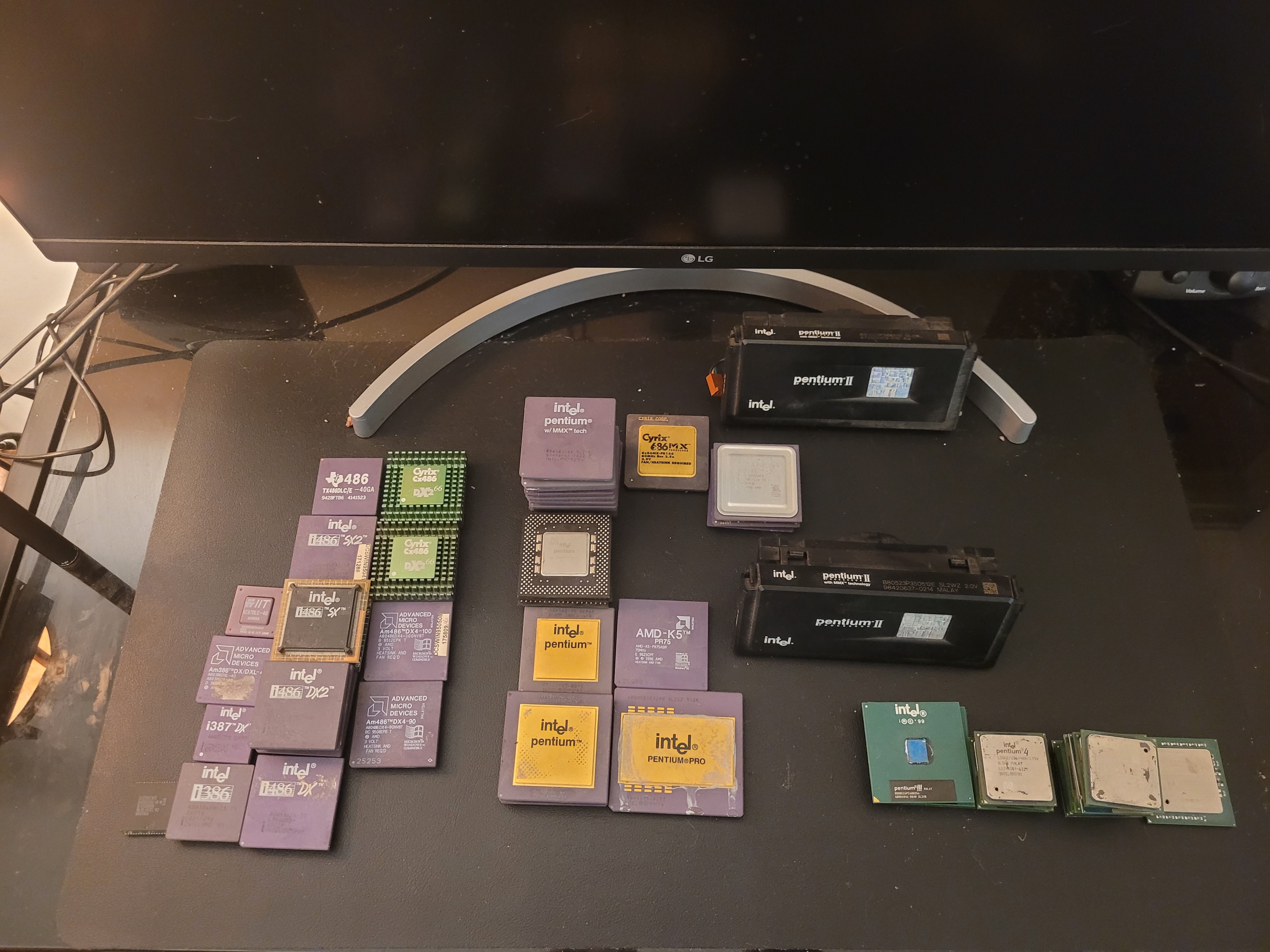
The 286 marks an important expansion in the capabilities of IBM-compatible business computers. The 386 brought a more complete 32-bit architecture and became a foundation for advanced multitasking and memory management. The separate 80387 captures a now-unfamiliar upgrade model: floating-point performance could require an additional processor installed beside the main CPU.
The 486 group shows how competitive the x86 market had become. Intel, AMD, Cyrix, and Texas Instruments offered alternatives differentiated by price, performance, clocking, and compatibility. Labels such as DX, DX2, SX2, and DX4 represented meaningful distinctions; selecting an upgrade required understanding much more than a single model number.
With Pentium, Intel replaced the familiar numerical sequence with a brand. The Pentium 60 and 75 mark the beginning of that era, while Pentium MMX reflects the rising importance of multimedia. Pentium Pro points toward professional and server workloads, and the distinctive Slot 1 Pentium II cartridge shows how processor packaging evolved alongside the silicon. Pentium III and Pentium 4 carry the shelf into an age of faster clocks, widespread Internet access, and increasingly standardized PCs.
The non-Intel chips are essential to the story. They demonstrate how compatible implementations and competition shaped prices, upgrade choices, and customer expectations across the broader PC ecosystem.
Ten Megabytes in a Dishwasher-Sized System
Perhaps the most dramatic artifact is a 10 MB Burroughs disk “cake” from a reader described as roughly the size of a dishwasher. It provides an immediate illustration of how radically storage has changed.
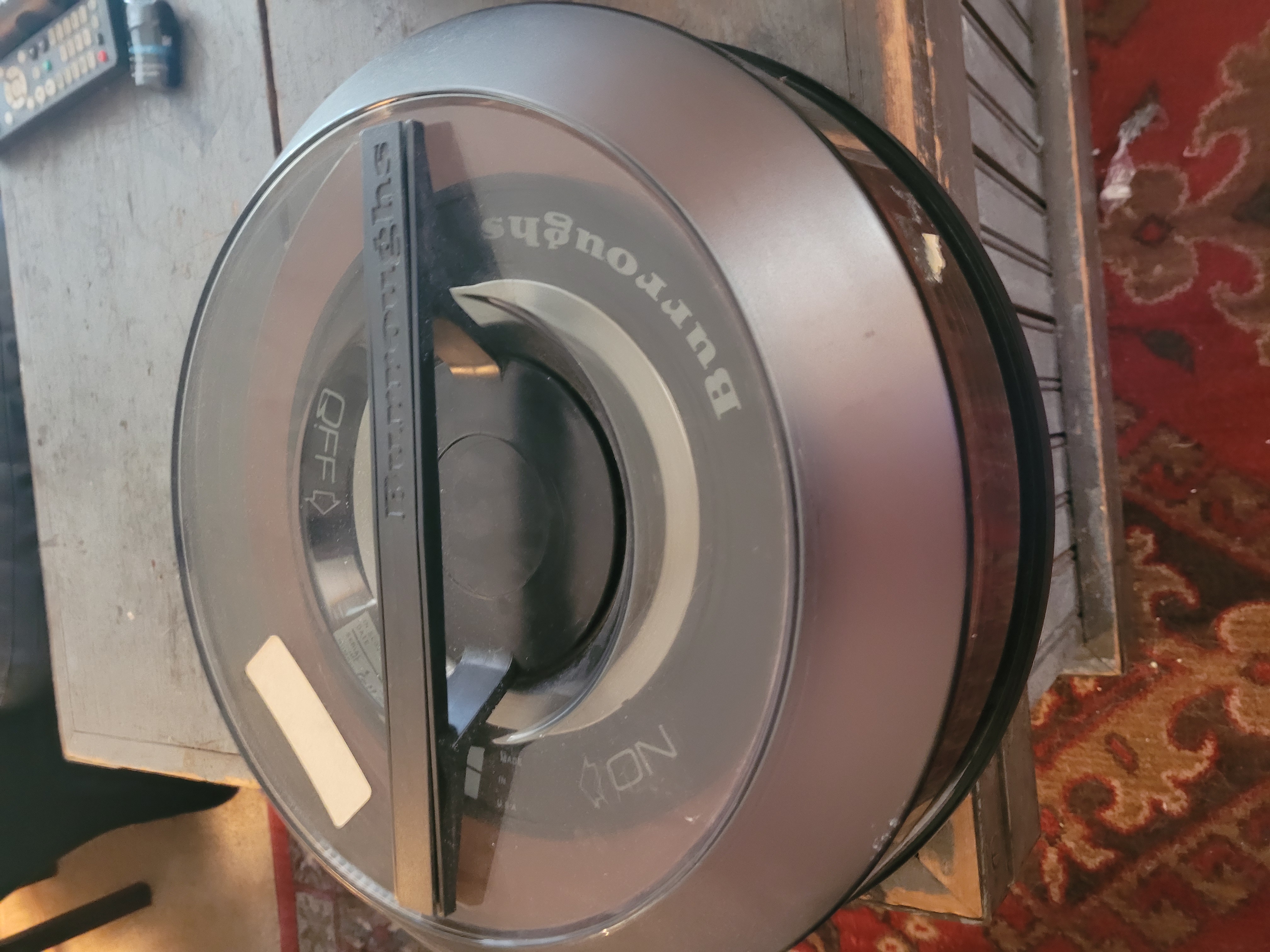
Early disk systems relied on large platters, powerful motors, precise mechanical assemblies, and cabinets that resembled industrial equipment. Burroughs, which evolved from mechanical adding machines into a major business-computer manufacturer, belonged to the pre-PC world of large organizational systems. Its 1986 combination with Sperry created Unisys.
By modern standards, 10 MB is trivial. Yet dismissing the equipment as inadequate misses the point. It was a significant engineering achievement for its time, developed when reliable random-access storage required enormous physical mechanisms and carefully controlled environments.
The Burroughs component gives the collection depth beyond the familiar desktop timeline. It connects the boxed PC software and processors to an earlier era of centralized computing, while making advances in density, reliability, portability, and cost immediately visible. Few comparisons communicate technological change as effectively as holding a 10 MB artifact in one hand while carrying vastly more storage in a pocket.
Why Preserve Old Technology?
The value of older technology is not limited to nostalgia. Digital history is fragile. Software disappears, installation media deteriorates, documentation is discarded, and hardware once considered ordinary becomes difficult to find in complete condition.
Physical objects preserve context that screenshots and emulators cannot fully recreate: the size of the packaging, the weight of the manuals, the number of installation disks, the language used to market new capabilities, the licensing models of the period, and the visible differences between processor generations. They also preserve the competitors that existed beside the eventual winners.
For me, the collection is personal. These products overlap with the development of my career and my long-standing interest in computing. DOS, early Windows, NetWare, Small Business Server, and Windows NT document the steps by which isolated machines became managed business environments.
The boxes have mostly disappeared. Floppy disks gave way to downloads, deployment services, and cloud provisioning. Physical servers were joined or replaced by virtualization and hosted services. Local directories evolved into cloud identity platforms, while manual workstation configuration became policy-driven endpoint management.
Yet the fundamental questions remain: How do we manage identity? How do we protect information? How do we connect people to shared resources? How do we maintain compatibility and upgrade without disrupting the business? How do we balance technical improvement with operational reality?
The tools changed. The consulting challenges changed far less.
A Technology Shelf That Tells a Story
Displayed together, the collection becomes a compact museum of business computing. IBM DOS 1.1 represents the establishment of the PC software platform. Lotus 1-2-3 shows why businesses wanted personal computers. The 286, 386, and 486 processors document the rapid growth of x86. NetWare captures the rise of the connected office. OS/2 Version 2.1 preserves an ambitious alternative path. Windows 3.1 through Windows XP trace the rise and maturation of Microsoft’s graphical desktop, while Windows NT Server and Small Business Server follow Microsoft into the server room.
The Burroughs disk component reaches further back, to a time when a small amount of storage required an enormous machine. None of these objects is powerful by modern standards. That is exactly what makes them meaningful.
They show that progress happened one processor, one operating system, one network card, one server, and one upgrade at a time. Each artifact solved a problem, introduced a new possibility, or competed to define what computing would become.
This shelf is not only a collection of older technology. It is a record of how we got here.
Collection Snapshot
Operating systems and server software: IBM DOS 1.1; Windows 3.1; Windows for Workgroups 3.11; Windows 95, 98, Me, 2000 Professional, and XP Professional; Windows NT Server 4.0; Microsoft BackOffice Small Business Server 4.5; IBM OS/2 Version 2.1; NetWare 3.12; IntraNetWare 4.0; and NetWare 4.2.
Applications and networking: Lotus 1-2-3 Version 1.0A and a Novell network interface card.
Processors: Examples from the 286, 386, 486, Pentium, Pentium Pro, Pentium II, Pentium III, and Pentium 4 generations, including Intel, AMD, Cyrix, and Texas Instruments models, plus an Intel 80387 math coprocessor.
Other hardware: A 10 MB Burroughs disk “cake” from a much larger storage system.