

Microsoft’s Copilot portfolio now combines subscription entitlements with usage-based services. That flexibility is useful, but it also makes a simple question surprisingly difficult: Will this interaction be included, consume Copilot Credits, or land on a different bill? This guide turns that question into a repeatable decision process for September 2026.
Executive summary
- Copilot Credits are a tenant-pooled consumption currency, not a per-user license. Pay-as-you-go is listed at $0.01 per credit, with capacity packs and annual pre-purchase options available for other consumption profiles.
- A Microsoft 365 Copilot user subscription does not include Cowork consumption. The subscription is a prerequisite, while Cowork tasks consume credits according to the work performed.
- Normal licensed Microsoft 365 Copilot productivity use is included. Core chat, supported Microsoft 365 app experiences, native Work IQ grounding, and qualifying Microsoft-built experiences do not create incremental Copilot Credit charges.
- Agent identity and execution context matter. Authenticated business-to-employee use can be included for a licensed user, while anonymous access, external channels, autonomous execution, certain harnesses, and advanced capabilities can be metered.
- GitHub Copilot is a different product on a different meter. It is licensed per developer seat, includes GitHub Copilot Chat with a paid seat, and consumes GitHub AI Credits rather than Copilot Credits.
- Security Copilot is separate. Security Copilot uses Security Compute Unit capacity rather than Copilot Credits.
Note that 🟨 Copilot Credits describes the meter, not the purchasing route. The same metered usage can be funded by pay-as-you-go, a capacity pack, or a pre-purchase plan.
The consultant’s 30-second magic map
Step 1: Does the user have a Microsoft 365 Copilot license?
If yes: core Copilot Chat, Microsoft 365 app experiences, native Work IQ grounding, Researcher, Analyst, Facilitator, and qualifying employee-facing agents are generally included. Then inspect the workload for explicit exceptions.
- Standard or Copilot Chat harness, authenticated B2E use: included for qualifying execution in Microsoft 365 channels, subject to service and fair-use limits.
- GitHub Copilot harness in Copilot Studio: Copilot Credits are required for its metered build, test, evaluation, and runtime activities. This is the Copilot Studio agent harness, not the separately licensed GitHub Copilot developer product.
- Computer-using agent, autonomous execution, external or unauthenticated channel, or BYOM: credits and/or a separate service charge can apply.
- Copilot Cowork: the Copilot license is required, but Cowork consumption is not included.
- Work IQ API: API use is metered even though native Work IQ grounding inside the licensed Copilot experience is included.
If no Copilot add-on, but the user has an eligible Microsoft 365 or Office 365 license: Copilot Chat Basic, web grounding, uploads, supported app context, and lightweight instruction or public-website agents can be available without Copilot Credits. Tenant-grounded agents, SharePoint agents, and Copilot Studio capabilities can require organizational usage-based billing.
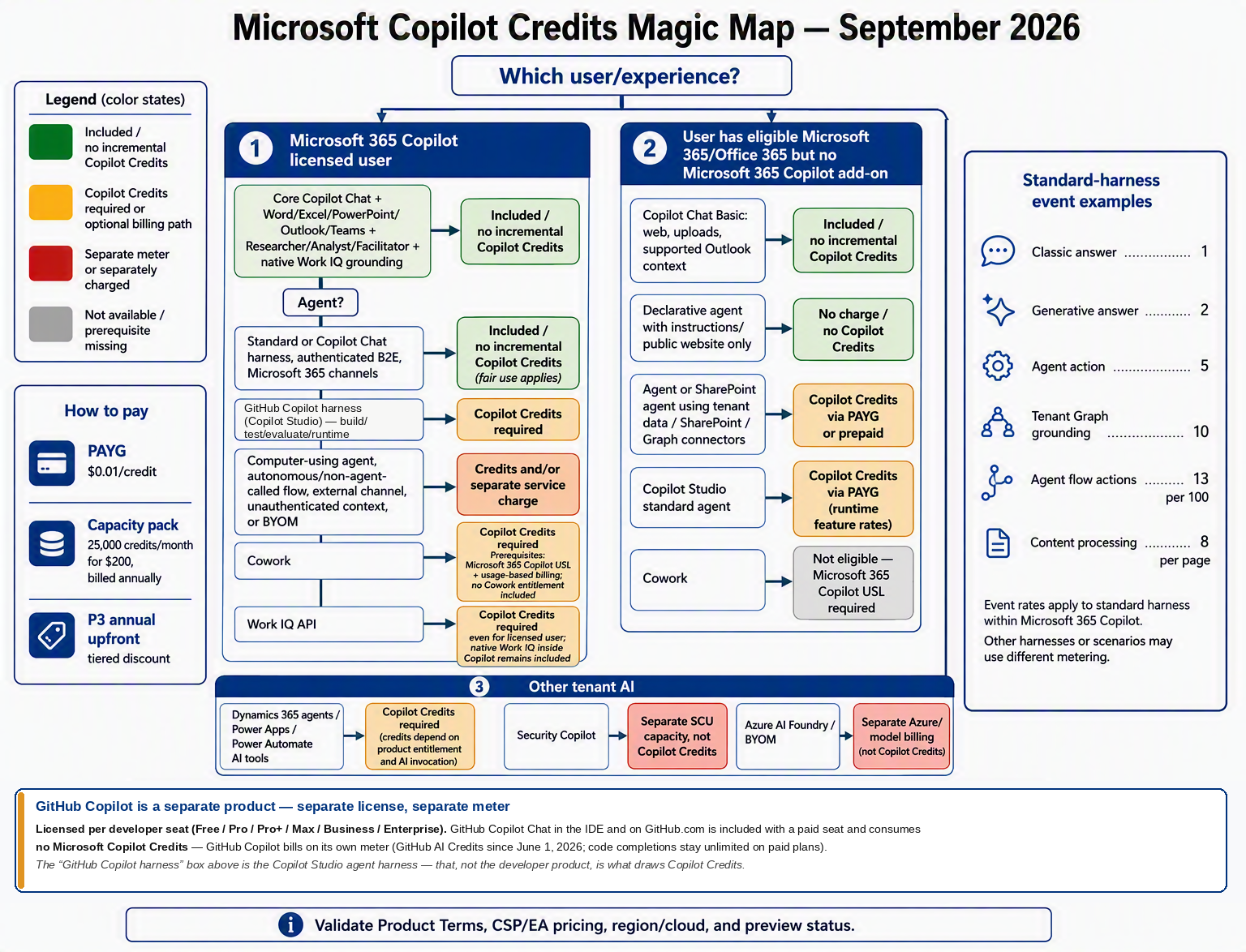
Detailed ecosystem matrix
| Experience | User or scenario | Answer | Billing trigger and important condition |
|---|---|---|---|
| Microsoft Copilot core experience | Microsoft 365 Copilot-licensed user | 🟩 Included | Core chat, supported app experiences, Microsoft-built agents, native Work IQ grounding, and model access are included. Service limits can still apply. |
| Copilot Chat Basic | Eligible user without Copilot add-on | 🟩 Included | Web grounding, uploaded content, image generation, and supported app context use the baseline service. Broad work grounding is not equivalent to the licensed experience. |
| Declarative agent using public content | Licensed or unlicensed Copilot Chat user | 🟩 Included | Instructions and public websites only, without shared tenant-data retrieval or metered capabilities. |
| Tenant-grounded Copilot Chat agent | User without Copilot add-on | 🟨 Copilot Credits | SharePoint, Graph or Copilot connectors, and shared tenant data cause metered consumption. Billing must be enabled. |
| SharePoint agent | Licensed Copilot user | 🟩 Included | Agent use is included, but the user still requires permission to the underlying content. |
| SharePoint agent | User without Copilot add-on | 🟨 Copilot Credits | Organization-enabled SharePoint agent usage consumes credits under its supported billing configuration. |
| Copilot Studio Standard or Copilot Chat harness | Licensed, authenticated employee-facing use | 🟩 Included | Qualifying answers, actions, tenant Graph grounding, and properly invoked agent flows are zero-rated when the agent acts as the licensed user. |
| Copilot Studio Standard harness | Unlicensed, anonymous, external, or otherwise nonincluded use | 🟨 Copilot Credits | Feature-based rates apply, and one interaction can invoke multiple metered events. |
| Autonomous or scheduled execution | No qualifying licensed-user context | 🟨 Copilot Credits | Standard rates apply. Background automation is not made universally free by owning a Copilot seat. |
| Computer-using agent | Including licensed-user initiation | 🟨 Copilot Credits | Computer use is billed as an agent action and can have wider Power Automate or RPA licensing dependencies. |
| GitHub Copilot (developer product) | Developer with a GitHub Copilot seat | 🟥 Separate meter | Requires its own GitHub Copilot seat, which includes GitHub Copilot Chat in supported IDEs and on GitHub.com. Usage is measured in GitHub AI Credits, not Copilot Credits, and code completions remain unlimited on paid plans. |
| GitHub Copilot harness in Copilot Studio | Maker and runtime scenarios | 🟨 Copilot Credits | LLM-assisted building, knowledge, tools, evaluation, and runtime are usage-based. Do not assume the standard B2E zero-rating. This is the Copilot Studio harness, not the GitHub Copilot seat. |
| Copilot Cowork | Microsoft 365 Copilot-licensed user | 🟨 Copilot Credits | Requires a seat plus enabled usage billing and a spending policy. Tasks consume credits based on work performed. |
| Work IQ in licensed Copilot | Normal Copilot interaction | 🟩 Included | Native grounding across organizational content is included. Direct API invocation is a different entitlement. |
| Work IQ APIs | Agent or application | 🟨 Copilot Credits | Variable query usage applies; the Work IQ Tools API is listed at 0.1 credit per API call. |
| Dynamics 365 and Power Platform AI | Product-dependent agent or AI feature | 🟦 Varies | Credits and included amounts depend on the product entitlement and AI capability invoked. Other licensing can remain necessary. |
| Security Copilot | Security portal, embedded experience, or security agent | 🟥 Separate meter | Uses Security Compute Unit capacity, not Copilot Credits. |
| Azure AI Foundry or BYOM | Model hosted outside Copilot Studio | 🟥 Separate meter | Azure model, token, and hosting charges are separate. Copilot Studio can still meter an action that invokes the tool. |
Copilot Studio: the conditions that matter
A Microsoft 365 Copilot license can cover employee-facing Copilot Studio use when the consuming user is licensed and authenticated, the agent acts as that user, the use case is business-to-employee, the execution occurs through a qualifying Microsoft 365 channel, and an agent flow uses the qualifying When an agent calls the flow invocation pattern.
Standard-harness published-use rate card
Published Standard-harness rates use several different denominators, so they cannot honestly be ranked against one another on a single axis. The three charts below are therefore split by unit. Each uses a linear scale, and each is scaled to the largest value in its own chart.
Per-event rates
Copilot Credits per response, action, message, or page. Agent-flow actions are published at 13 credits per 100 actions and are shown here divided down to a per-action figure so they can be compared fairly.
Text and generative AI tools
Copilot Credits per 10 responses. Microsoft also publishes these as 0.1, 1.5, and 10 credits per 1,000 tokens, per 1,000 characters, per image, or per page. This is the tier that most often turns a cheap agent into an expensive one.
Voice tiers
Copilot Credits per minute. Core agent activity such as classic answers, generative answers, and agent actions is included within the voice rate.
Authoring and testing are not all treated the same
For the Standard harness, billing generally begins after publication, while test-panel prompts are free. However, prompts or models inside agent flows can consume credits during testing. In the GitHub Copilot harness, natural-language building, previewing, testing, evaluation, and runtime are usage-based; manual non-LLM configuration is treated differently.
Copilot Cowork: access is licensed, work is metered
Copilot Cowork for work and school accounts became generally available on June 16, 2026. Cowork requires an assigned Microsoft 365 Copilot user subscription, tenant enablement, usage-based billing, an applicable spending policy, and supported tenant and client prerequisites.
The subscription does not create a Cowork credit entitlement. Consumption varies with model choice, context retrieval, tool and skill calls, orchestration and runtime, image generation, and browser tasks. Microsoft does not publish a single fixed credits-per-prompt rate. The /cost command can show an approximate aggregate for a task, but it is not the official invoice ledger.
Buying Copilot Credits
| Purchasing route | Commercial structure | Best fit |
|---|---|---|
| PAYG | $0.01 per credit, billed in arrears through the connected Azure billing arrangement | Pilots, uncertain demand, or seasonal usage |
| Copilot Studio capacity pack | $200 per month, billed annually; 25,000 credits per month; unused monthly credits do not roll over | Stable monthly consumption |
| Copilot Credit Pre-Purchase Plan (P3) | One-year upfront pool with published volume tiers | Predictable enterprise-scale usage |
| Microsoft Agent P3 | Broader annual commitment for eligible agentic usage across supported platforms | Cross-platform agent estates |
Supported purchasing options can coexist. Prepaid capacity can cover planned consumption while PAYG provides an overage path.
Simple list-price comparison
Monthly list cost
US list price per month, on a linear scale.
Break-even at list price: $200 ÷ $0.01 = 20,000 credits per month
Below 20,000 credits, PAYG has the lower simple list cost. Above 20,000 credits, a fully utilized 25,000-credit pack has the lower list cost, subject to the annual billing commitment and the loss of unused monthly credits.
Illustrative workload calculations
- Graph-grounded generative agent: 200 unlicensed users × 20 interactions per month × 12 credits = 48,000 credits, or $480 PAYG. Two capacity packs provide 50,000 credits for $400 per month under the applicable annual commitment.
- Cowork planning example: if observed usage averages 300 credits per task, 50 users × 10 tasks per month × 300 = 150,000 credits, or $1,500 PAYG. Six capacity packs provide the same 150,000 credits for $1,200 per month under the applicable annual commitment. The 300-credit value is an illustrative planning assumption, not a Microsoft fixed rate.
Terminology and traps
- “Messages” is legacy terminology. The common agent consumption currency moved to Copilot Credits, but older documentation and operational language can still surface.
- Microsoft Copilot and Microsoft 365 Copilot can coexist in documentation. Confirm whether a page is discussing the product family, the paid user entitlement, or a usage-based service.
- GitHub Copilot is not Microsoft 365 Copilot, and GitHub AI Credits are not Copilot Credits. Developer seats are bought, licensed, and metered separately, so they do not belong in a Copilot Credit consumption model. The only overlap in this guide is the similarly named Copilot Studio harness.
- Copilot Credits are not consumer AI credits. Consumer Microsoft 365 subscription limits are a different construct and should not be used for tenant planning.
- A licensed user does not create a shared credit pool for coworkers. The license covers that person’s qualifying use; other metered users need organizational funding.
- Not every agent interaction is charged. Public-content declarative agents and qualifying authenticated employee-facing use can be included.
- Credits do not replace other licensing. Dataverse, Power Platform premium rights, Dynamics restrictions, external-user access, Azure-hosted models, and automation dependencies can still apply.
Recommended client governance baseline
- Segment the audience into licensed frequent Copilot users, unlicensed Copilot Chat users, Cowork users, agent makers, external or customer audiences, and developers on GitHub Copilot seats, which are budgeted and metered outside this model.
- Inventory every agent’s harness, authentication, channel, data sources, triggers, tools, owning environment, and downstream services.
- Begin uncertain workloads with PAYG and explicit user or group controls, then consider packs or P3 after observing stable consumption.
- Treat a Cowork spending policy as both cost control and access control. A policy that permits consumption also enables access until the configured limit is reached.
- Monitor Cowork and Work IQ usage in Microsoft 365 Cost Management and Copilot Studio consumption in the Power Platform admin center, recognizing that operational views differ by workload.
- Revalidate the decision map before a large order because licensing guides, harness availability, pricing, and preview boundaries can change.
Official Microsoft references
- Copilot Credits licensing guidance
- Copilot Credits Guide, September 2026
- Usage-based billing and cost management for Copilot Credits
- Billing rates and management for Microsoft Copilot Studio
- Standard harness licensing
- Assign user licenses and manage access
- Licensing and Copilot Credits for AI Builder
- Get started with Microsoft 365 Copilot Cowork
- Copilot Cowork admin and governance
- Cost considerations for Microsoft 365 Copilot extensibility
- Copilot capacity packs
- Microsoft 365 Copilot Credits activity reports
- Compare dashboard views for usage-based billing
- Security Copilot compute units capacity
- GitHub AI Credits and usage-based billing for organizations and enterprises
- GitHub Copilot plans and pricing
- Copilot Cowork general availability announcement
- Get started with agents in SharePoint