

Bottom line
Microsoft 365 Business Premium includes two separate, assignable Defender service-plan entitlements:
- Microsoft Defender for Business, service plan
MDE_SMB, GUIDbfc1bbd9-981b-4f71-9b82-17c35fd0e2a4. - Microsoft Defender for Office 365 Plan 1, service plan
ATP_ENTERPRISE, GUIDf20fedf3-f3c3-43c3-8267-2bfdd51c0939.
MDE_LITE, which is not part of the Business Premium SPB SKU.Defender for Business is a distinct endpoint entitlement with a composite capability set. It includes MDE P1 capabilities, selected P2-class capabilities, and SMB-specific simplified management. Functional overlap does not convert it into separate P1 or P2 entitlements.
ATP_ENTERPRISE service plan, making it a genuine separate entitlement.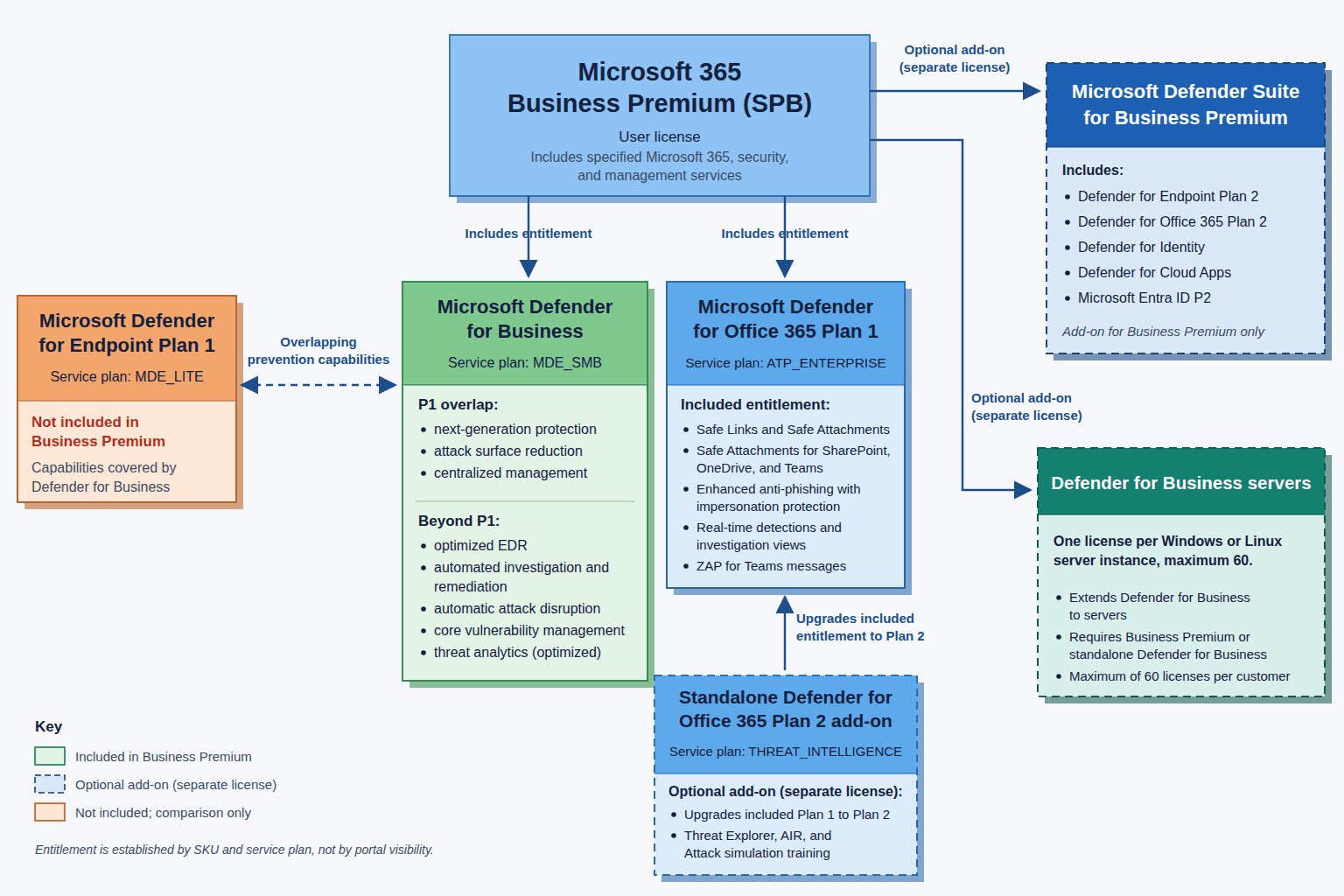
Entitlement versus capability
A feature visible in the Microsoft Defender portal is not proof of a particular product entitlement. The portal brings multiple workloads together, and several products share technologies and controls. Establish entitlement from the assigned SKU and service plans.
| Product or capability | Business Premium position | Classification | Practical meaning |
|---|---|---|---|
Defender for Business (MDE_SMB) | Included | Separate entitlement | Endpoint-security rights, subject to five-device and 300-user limits. |
MDE Plan 1 (MDE_LITE) | Not present | Overlapping capabilities | Similar prevention features are delivered through Defender for Business, but MDE P1 is not separately owned. |
MDO Plan 1 (ATP_ENTERPRISE) | Included | Separate entitlement | Plan 1 email and collaboration protection is licensed. |
| MDE Plan 2 | Not included | Add-on or qualifying license | Available through Microsoft Defender Suite for Business Premium or another qualifying P2 subscription; all users must be licensed for P2 before the tenant can switch experiences. |
| MDO Plan 2 | Not included | Add-on required | Available as an MDO add-on or through Defender Suite for Business Premium. |
| Defender for Business servers | Not included in user licenses | Per-server add-on | One license per Windows or Linux server instance, up to 60. |
| Microsoft Defender portal | Shared admin surface | Portal access | Visibility depends on licensed workloads and administrator permissions. |
Defender for Business compared with MDE P1 and P2
Microsoft describes Defender for Business as containing MDE P1 features, some P2 features, and SMB-specific features. It uses the Defender for Endpoint technology platform, but remains separately packaged.
| Capability | Defender for Business | MDE P1 | MDE P2 |
|---|---|---|---|
| Next-generation antivirus and antimalware | Yes | Yes | Yes |
| Attack-surface reduction | Yes | Yes | Yes |
| Centralized portal management and APIs | Yes | Yes | Yes |
| Windows, macOS, iOS/iPadOS, and Android | Yes | Yes | Yes |
| Manual endpoint response actions | Yes | Yes | Yes |
| Endpoint detection and response | Yes, optimized | No | Yes |
| Automated investigation and remediation | Yes | No | Yes |
| Automatic attack disruption | Yes | No | Yes |
| Core vulnerability management | Yes | No | Yes |
| Threat analytics | Yes, optimized | No | Yes |
| Simplified firewall and antivirus configuration | Yes, SMB-specific | No | No |
| Monthly security summary reporting | Yes | No | Yes |
| Threat hunting (30 days of advanced hunting data) | No | No | Yes |
| Six-month endpoint data retention | No | No | Yes |
| Microsoft Threat Experts | No | No | Yes |
The P1 overlap centers on next-generation protection, attack-surface reduction, manual response actions, centralized management, Intune integration, reporting, and APIs. Defender for Business goes further with optimized EDR, automated investigation and remediation, automatic attack disruption, core vulnerability management, optimized threat analytics, and monthly security summary reporting.
MDE_SMB, not proof that the user separately owns MDE P2.The P2 upgrade adds threat hunting with 30 days of advanced hunting data, six months of device-data retention, and Microsoft Threat Experts. Enterprise IoT device security is not part of MDE P2 itself; it is included with Microsoft 365 E5 and E5 Security, or purchased as a per-device add-on to standalone MDE P2.
Defender for Office 365 Plan 1 is separately included
The Business Premium SPB SKU contains ATP_ENTERPRISE, whose friendly name is Microsoft Defender for Office 365 Plan 1. Microsoft’s service description also identifies Plan 1 as included in Business Premium.
Principal Plan 1 capabilities
- Safe Attachments for email.
- Safe Attachments for SharePoint, OneDrive, and Teams files.
- Safe Links for email, supported Office applications, and Teams.
- Enhanced anti-phishing, user and domain impersonation protection, mailbox intelligence, and phishing thresholds.
- Email and collaboration alerts.
- Real-time detections, email entity pages, reporting, and user tags (including the Priority account tag for filtering).
- Teams protections, including zero-hour auto purge (ZAP) for malicious Teams messages, extended to Plan 1 in January 2026 (not available in GCC, GCC High, or DoD).
The Plan 1 service plan itself is present in the assigned license. That is the key difference from MDE P1.
Practical licensing interpretation
- Endpoint protection: Defender for Business on up to five concurrent client devices per licensed user. User licenses do not grant server operating-system rights.
- Email and collaboration protection: MDO Plan 1 for the licensed user’s protected email, links, attachments, Teams, SharePoint, and OneDrive interactions, subject to policy scope.
- Administration and investigation: The appropriate Defender for Business and MDO P1 experiences in the Defender portal. Portal visibility does not grant rights to unlicensed P2 features or users.
Adding Defender for Office 365 Plan 2
What P2 adds
- Threat Explorer rather than the more limited Real-time detections experience.
- Threat Trackers and campaign views.
- Automated Investigation and Response.
- Attack Simulation Training.
- Advanced hunting, Defender XDR incident and alert investigation, and additional API and SIEM integration.
- Priority account protection (differentiated filtering for tagged users, beyond the tag itself) and additional Teams investigation and remediation.
Acquisition paths
- MDO add-on subscription: Business Premium supplies P1; the add-on upgrades the licensed user to P2.
- Microsoft Defender Suite for Business Premium: This add-on, which requires Business Premium, supplies MDO P2, MDE P2, Defender for Identity, Defender for Cloud Apps, and Microsoft Entra ID P2 capabilities.
The standalone MDO P2 SKU contains both ATP_ENTERPRISE and THREAT_INTELLIGENCE. P2 is a cumulative capability level, not a second independently usable email-security stack.
Per-user considerations
Licenses are required for every user or resource benefiting from protection, including users accessing protected mailboxes, protected shared mailboxes, users of SharePoint, OneDrive, or Teams where Safe Attachments is enabled, and users of Microsoft 365 Apps or Teams benefiting from Safe Links.
Defender for Business servers
Business Premium user licenses do not cover Windows Server or Linux server operating-system environments. The customer must own at least one paid Business Premium or standalone Defender for Business license, purchase one Defender for Business servers license for each instance, and remain within the maximum of 60 server licenses per customer or subscription. These licenses are capacity and are not assigned to users or individual devices in the admin center.
Above 60 servers, Microsoft directs customers to Defender for Endpoint for servers or Microsoft Defender for Servers Plan 1 or Plan 2 (part of Microsoft Defender for Cloud). A tenant that moves all endpoint users to the Defender Suite or MDE P2 experience must also transition existing Defender for Business servers licensing.
Material limits and transition caveats
- 300-seat ceiling: The Microsoft 365 Business family is limited to 300 seats.
- Five client devices per user: This is a concurrent client-device entitlement, not a pooled server right.
- Endpoint mixed licensing: A tenant with Defender for Business and MDE P2 defaults to the Defender for Business experience. All users must be licensed for MDE P2 and Microsoft Support must switch the tenant before P2 becomes authoritative.
- MDO policy scoping differs: Policies can be scoped to appropriately licensed users, but all benefiting users, mailboxes, and collaboration users must be licensed.
- Crossing 300 users requires planning: Move deliberately to enterprise endpoint subscriptions rather than assuming added E3 or E5 users automatically convert the tenant experience. Note the trade-offs: Microsoft 365 E3 includes MDE P1 (not P2-class EDR), and since July 1, 2026 it also includes MDO P1, so email protection carries over while endpoint capability steps down unless MDE P2 or E5 is added.
Final takeaway
Business Premium includes substantial endpoint, email, and collaboration security, but accurate licensing language matters. Defender for Business is its own entitlement with P1 overlap and selected P2-class features. Defender for Office 365 Plan 1 is a separate included service plan. MDE P2, MDO P2, and server protection require additional licensing paths.
For assessments and customer designs, begin with the assigned SKU and service-plan identifiers. Then map capabilities, policy scope, device limits, and transition requirements. That is more defensible than inferring licensing from controls visible in a shared portal.
References
- Microsoft Learn: What is Microsoft Defender for Business?
- Microsoft Learn: Get Microsoft Defender for Business
- Microsoft Learn: Defender for Business FAQ
- Microsoft Learn: Business Premium security FAQ
- Microsoft Learn: Defender for Office 365 service description
- Microsoft Learn: Defender for Office 365 features service description
- Microsoft Learn: Zero-hour auto purge in Defender for Office 365
- Microsoft Learn: Product names and service plan identifiers for licensing
- Microsoft Product Terms: Microsoft 365
- Microsoft Product Terms: Microsoft Defender