

The first article in this series started with a licensing problem. The word Copilot now appears across subscription-included productivity experiences, usage-based services, agents, APIs, development platforms, and separate capacity models. The Magic Map helped identify whether an interaction was included, consumed Copilot Credits, or landed on another meter.
The second article shifted from licensing to the work itself. Microsoft 365 Copilot helps the user research, reason, summarize, create, and decide. Copilot Cowork extends that process by coordinating multi-step work across applications, information sources, tools, and deliverables.
That creates the next question. What happens when delegated AI work is no longer an occasional task performed by one licensed user? What happens when an organization has dozens, hundreds, or eventually thousands of agents created across Microsoft 365, Copilot Studio, Microsoft Foundry, custom applications, endpoints, partner platforms, and external services?
At that point, the challenge is no longer limited to licensing Copilot, funding Copilot Credits, or teaching someone how to write a better prompt. The organization needs to know which agents exist, who owns them, what business purpose they serve, which identities and permissions they use, what data and tools they can reach, what actions they have taken, whether their activity is visible to security and compliance teams, and how they can be blocked or retired when their purpose ends.
That is the problem Microsoft Agent 365 is designed to address. Microsoft describes Agent 365 as a centralized control plane for observing, governing, and securing agents across an organization. It provides an inventory of agents and connects agent administration with Microsoft 365, Microsoft Entra, Microsoft Purview, Microsoft Defender, and other parts of the Microsoft security and governance ecosystem.
From One Cowork Task to an Agent Estate
A single Cowork task does not create an enterprise fleet-management problem. A user may ask Cowork to review approved project files, prepare an executive update, create a presentation, draft a stakeholder email, and propose a follow-up meeting. The task may touch several applications, but the work remains connected to a specific user and outcome.
The operating model changes when that pattern becomes reusable. A team may turn a successful workflow into an agent. Another department may create its own version. A developer may build a custom agent in Microsoft Foundry. A business user may publish an agent from Copilot Studio. A partner platform may introduce specialized agents. An endpoint may run local agent software. The organization no longer has one delegated task. It has an estate.
That estate may include Microsoft-built agents, agents created with Copilot Studio, agents built or hosted in Microsoft Foundry, custom-developed agents, partner or software-as-a-service agents, locally installed agents, externally synchronized agents, and agents integrated through the Agent 365 SDK. The question shifts from “Can the AI complete this work?” to “Can the organization account for every agent completing work?”
What Microsoft Agent 365 Actually Is
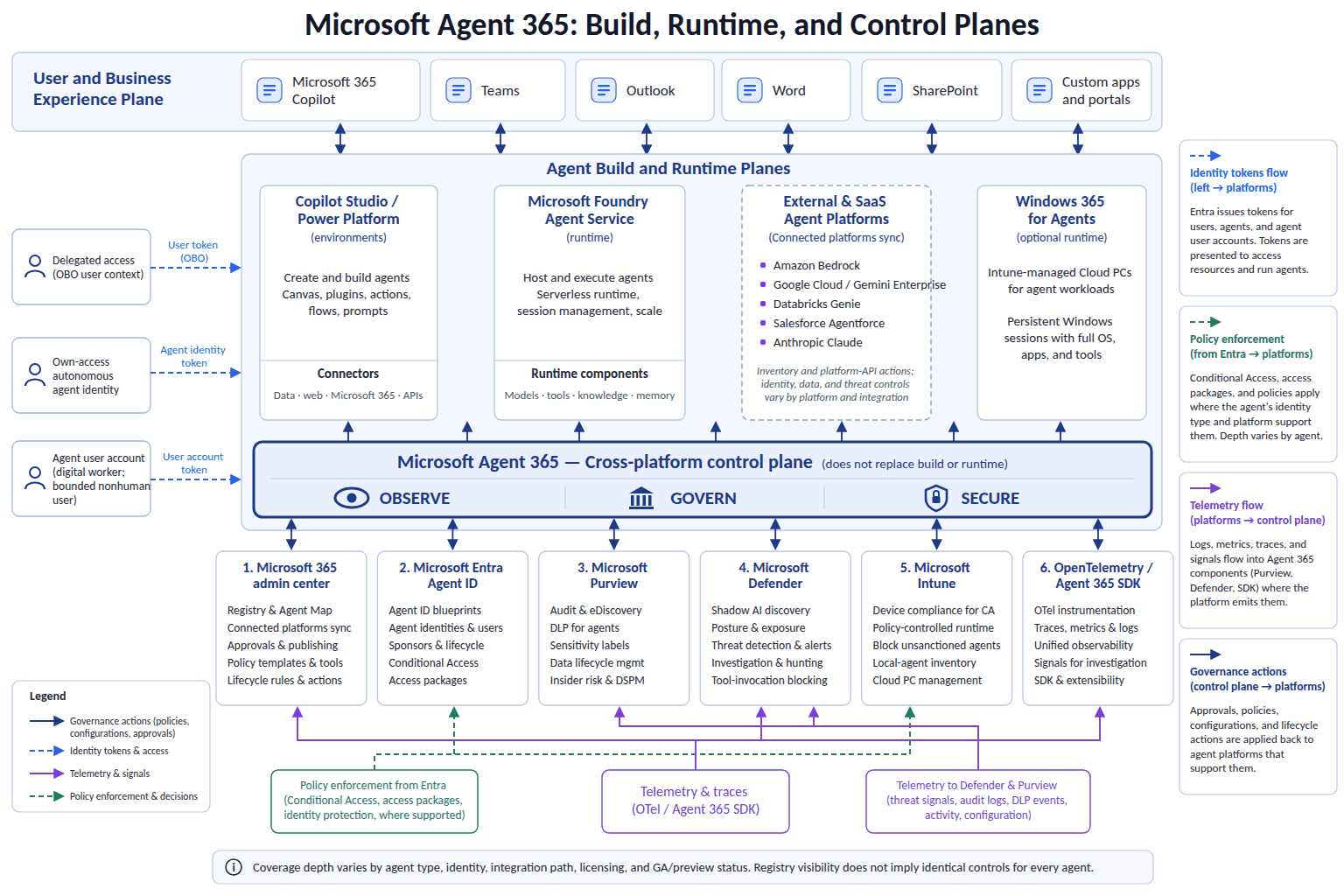
Microsoft Agent 365 is best understood as a cross-platform agent control plane. It is not a large language model, an agent-building environment, or the runtime that performs every agent task. It does not replace Copilot Studio, Microsoft Foundry, Microsoft Entra, Microsoft Purview, Microsoft Defender, Microsoft Intune, or the Power Platform administration model.
Instead, Agent 365 supplies a broader management layer for discovering, observing, governing, and securing an agent population. Microsoft positions the Microsoft 365 admin center as a centralized administrative experience, while the underlying identity, data-protection, security, endpoint, development, and runtime controls continue to exist in their specialized services.
That distinction matters. The phrase unified control plane can create an unrealistic expectation that every configuration, investigation, and enforcement action now happens in one portal. A better mental model is federated governance. Agent 365 helps establish a central view of the fleet and coordinates governance across services. Entra remains responsible for identity and access. Purview provides data security, compliance, audit, and information protection. Defender contributes security posture, threat detection, investigation, and protection. Intune continues to manage supported endpoint scenarios. Copilot Studio, Foundry, custom applications, and external platforms continue to supply their respective building and runtime environments.
The Governance Model: Inventory, Identity, Ownership, and Evidence
An organization cannot govern an agent it does not know exists. That makes inventory the logical starting point. Microsoft Agent 365 includes an Agent Registry that provides a centralized inventory of agents known to the organization. Microsoft documentation also describes capabilities for visualizing relationships and activity, although specific mapping, API, external synchronization, and lifecycle capabilities should always be validated against current documentation and the customer’s tenant.
A useful record should answer who created the agent, who currently owns it, which platform published it, whether it is Microsoft-built or organizationally published, what business purpose it serves, which channels expose it, which data and tools it uses, whether it acts for a user or through its own access, whether it is still active, and whether the organization receives enough telemetry to manage its risk.
Identity is the second foundation. In the Magic Map, identity helped determine whether an experience was subscription-included, usage-based, externally billed, or subject to another entitlement. In the Copilot and Cowork discussion, identity determined which organizational information and actions were available when work was performed in a user’s context. In Agent 365, identity becomes a long-term accountability mechanism.
An agent acting on behalf of a user is not the same as an agent operating through its own access. Delegated access can be appropriate for user-centered work because the action remains connected to a person’s permissions, but it does not fix overshared SharePoint sites, broad group memberships, permissive links, excessive delegated consent, or weak data classification.
Own-access agents may be necessary for background or autonomous scenarios, but they require a stronger review of application permissions, credentials, sponsorship, access reviews, and revocation paths. An agent identity blueprint is not merely developer metadata. If the blueprint carries reusable identity and permission patterns, approving it deserves the same rigor applied to application consent, privileged access, and security architecture.
Ownership is the third foundation. One of the most practical agent-lifecycle risks is abandonment. A maker creates an agent, others adopt it, and the original maker later changes roles or leaves. The technology may still run, but accountability has disappeared.
Every production agent should have more than a creator. It should have:
- an accountable business owner;
- a technical owner or operational team;
- a documented business purpose;
- approved data, tools, audiences, and actions;
- support and incident contacts;
- review dates; and
- retirement criteria.
Observability and Security Still Matter
An agent estate requires evidence. Basic adoption information may show that an agent is being used, but operational governance needs deeper answers: which identity initiated the activity, which agent processed it, what tools were called, what data was accessed, whether the action succeeded, whether a policy boundary was encountered, how much consumption occurred, and whether the sequence can be reconstructed during an investigation.
Microsoft’s Agent 365 documentation describes observability and monitoring capabilities for agent activity, while the broader design uses integrations with identity, security, compliance, and administration services. The precise telemetry available can vary according to the agent platform and integration. That gives organizations a reason to make observability a production requirement rather than an optional enhancement.
Agent 365 does not create a new security island. Its value comes partly from extending and coordinating Microsoft’s existing security and governance ecosystem around agents. Entra remains the identity and access layer, Purview the data-security and compliance layer, Defender the threat-protection layer, and Intune the endpoint-management layer for supported scenarios.
That reuse is strategically useful, but organizations should avoid assuming protections apply automatically and uniformly. The actual design still needs to be validated. Does the agent use an identity Conditional Access can evaluate? Is its activity represented in the expected audit location? Are Purview policies applicable to the channel and action? Does Defender receive enough telemetry from the runtime? Can the platform disable or retire the agent during an incident? The answer may differ by agent, platform, channel, identity, and release status.
Human Approval Is Still Part of the Architecture
Part 2 emphasized that human approval is not merely friction. It is a control boundary. That principle does not disappear when an organization adopts Agent 365. A registry, identity, policy template, audit record, or security alert does not automatically determine whether a particular business action should have occurred.
Consequential boundaries may include sending externally, publishing content, changing access, deleting information, altering financial or customer records, creating contractual commitments, provisioning resources, invoking high-impact tools, accessing sensitive data, or making decisions that affect people. Human oversight should be designed around those boundaries, not added as a vague final review after every other step has completed.
For lower-risk processes, review may focus on exceptions. For higher-risk processes, approval may be required before data is accessed, before an interpretation is accepted, before an artifact is published, or before an external action occurs. Agent 365 can support a governable estate, but the organization must still define what acceptable delegation means.
Licensing and Cost: Governance Does Not Replace Consumption
The Magic Map remains relevant because Agent 365 adds another governance layer without eliminating the underlying commercial models. The practical cost of an agent estate may include Microsoft 365 and Copilot user licensing, Agent 365 governance licensing, Copilot Credits and agent consumption, Foundry model or hosting costs, Power Platform or Dataverse dependencies, endpoint or Windows 365 compute, and third-party platform charges.
Microsoft 365 and Copilot user licensing
                  +
Agent 365 governance licensing
                  +
Copilot Credits and agent consumption
                  +
Foundry, automation, infrastructure, and third-party costs
                  =
The practical operating cost of the agent estate
Microsoft’s service description identifies Agent 365 as a standalone subscription for eligible Microsoft 365 subscriptions and as a component included with Microsoft 365 E7. Agent 365 reached general availability on May 1, 2026, and Microsoft announced standalone pricing of USD 15 per user per month at that time. The service description also distinguishes between foundational agent-management capabilities and capabilities that require Microsoft 365 E7 / G7 or Agent 365. Foundational capabilities, such as the Agent Registry inventory, basic governance actions, rules-based lifecycle automation, and synchronization of agents from external platforms, are included with eligible Microsoft 365 Enterprise, Business, Education, and Frontline plans. Policy templates, observability, tenant-wide tool controls, and most of the Entra, Purview, Defender, and Intune agent capabilities require Agent 365 or E7 / G7.
The important point is architectural as much as financial. Agent 365 governs the estate. A standalone Agent 365 subscription does not include Microsoft 365 Copilot user entitlements. Microsoft 365 E7 does bundle Microsoft 365 Copilot alongside Agent 365, Microsoft 365 E5, and Microsoft Entra Suite, but neither option automatically covers Copilot Cowork consumption, Copilot Studio usage funded through Copilot Credits, Microsoft Foundry inference or hosting, separate Power Platform requirements, endpoint compute, or external platform charges. Governance licensing and runtime consumption solve different problems.
A Practical Adoption Sequence
Agent governance should begin before autonomous use expands, not after the estate has already become difficult to understand. A practical sequence looks like this:
- Build the inventory. Identify known agents across Microsoft 365, Copilot Studio, Foundry, custom applications, supported external platforms, and endpoint scenarios. Preserve the initial inventory as evidence.
- Classify the estate. Record owner, sponsor, purpose, platform, identity pattern, audiences, channels, data sources, tools, triggers, criticality, approval requirements, telemetry expectations, and retirement conditions.
- Separate experimentation from production. A personal read-only experiment should not follow the same operating model as a department-wide agent that updates records or communicates externally.
- Review permissions before autonomy. Validate delegated permissions, application permissions, group memberships, SharePoint access, connectors, external systems, credentials, and downstream service rights.
- Require observability. Define the minimum telemetry required for production approval, including identity correlation, tool activity, failure investigation, and response ownership.
- Validate security and compliance coverage. Test applicable Entra, Purview, Defender, Intune, and Power Platform controls against the real interaction pattern.
- Test lifecycle actions. Confirm how approval, publication, ownership transfer, blocking, consent revocation, disabling, deletion, and offboarding work before an incident occurs.
- Review and retire. Periodically confirm whether each agent is still used, still owned, still secure, still cost-effective, and still aligned with its approved purpose.
This turns agent governance into a sustainable operating process instead of a one-time configuration exercise.
When Does Agent 365 Become Compelling?
Agent 365 becomes most compelling when the organization’s problem has shifted from building an individual agent to managing an agent population. Warning signs include unreliable inventory, unclear ownership, multiple governance islands, agents still active after makers leave, permissions that cannot be explained, telemetry that cannot support investigation, costs that cannot be connected to outcomes, lifecycle actions that have never been tested, or uncertainty about how an agent would be stopped during an incident.
Final Thoughts
The Magic Map helped answer which meter applies. Copilot and Cowork showed how work can move from human direction to delegated execution. Microsoft Agent 365 completes the picture by addressing what happens when those experiences scale into an enterprise agent estate.
Organizations do not only need to know what an agent costs or whether it can complete a task. They need to know that the agent exists, who owns it, which identity it uses, what it can access, which tools it can invoke, what it has done, whether its activity can be investigated, and how it can be stopped.
Agent 365 does not replace Copilot Studio, Microsoft Foundry, Entra, Purview, Defender, Intune, Power Platform, or the agent runtime. Its role is to help connect those boundaries into an operating model that makes agents discoverable, attributable, policy-addressable, observable, and manageable throughout their lifecycle.
The objective should not be heavy bureaucracy around every AI experiment. The objective should be proportional governance. A personal, read-only experiment does not require the same controls as an autonomous production agent with sensitive data and consequential tools. As access, autonomy, impact, and scale increase, identity, evidence, approval, security, monitoring, and lifecycle requirements should increase with them.
Licensing and Availability Disclaimer
Registration or visibility in Agent 365 should not be interpreted as proof that every agent receives identical identity protection, data security, runtime enforcement, observability, or lifecycle-management capabilities. Coverage depends on the agent platform, runtime, identity, telemetry, integration, licensing, and current product availability.
Related Reading
Official Microsoft References
- Microsoft Agent 365 overview
- Microsoft Agent 365 documentation
- Microsoft Agent 365 service description
- Microsoft Agent 365 developer documentation
- Security for AI with Microsoft Agent 365
- Microsoft Agent 365 observability
- Manage agents in the Microsoft 365 admin center
- Agent settings in the Microsoft 365 admin center
- Microsoft 365 agents overview
- Microsoft Copilot Studio billing and licensing